Marc Saltzman
Apple's New MacBook Air
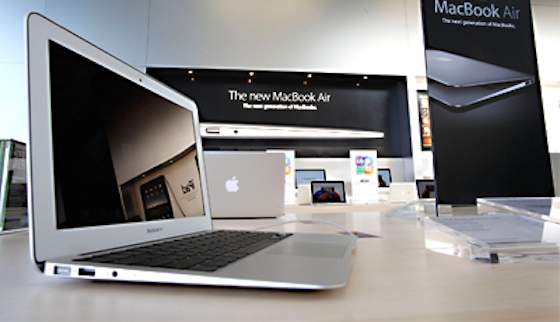
At first glance, Apple’s recently upgraded MacBook Air looks no different than the model launched last September.
It’s what’s under the hood that’s garnering the most attention. That and the fact that it’s the first to ship preloaded with OS X Lion, the latest operating system refresh, which adds a number of new features and improvements over its predecessors.
The new MacBook Air is available with an 11-inch LED display (from $999) or a 13-inch one (from $1,299). As with last year’s models, the MacBook Air is just 0.11 inch at its thinnest point and 0.68 inch at its thickest, and it weighs only 2.38 pounds for the 11-inch model (just under 3 pounds for the 13-incher).
A Tool for the Mobile Worker
Because it’s thinner and lighter than most other laptops, it’s ideal for on-the-go businesses -- not to mention it delivers up to seven hours of battery life for the 13-inch version (up to five for the 11-inch). The large, multi-touch glass trackpad is still the best in the industry, especially with all the new gestures added to the OS X Lion platform to help you get more done in less time.
Instead of a hard drive, the MacBook Air models use Flash memory -- similar to what’s inside an iPad -- yielding faster startup times and data access, better battery performance and lighter weight. Flash memory is more durable than a hard drive, but it can’t store as much data as a hard drive. The MacBook Airs start at 64 GB and go up to 256 GB (the latter for $1,599). Even with 256 GB of memory, this is only about half the storage offered by most hard drive-based laptops.
If you do a lot of work in the cloud -- that is, accessing, sharing and collaborating on files stored in cyberspace -- a Flash-based computer may be all you need. But if you need to carry around a lot of files, you may opt for a small external hard drive to use when needed.
Speedy, but No Optical Drive
The new Intel Core i5 and Core i7 dual-core processors are about twice as fast as last year’s models -- which were no slouch either. Aside from the entry-level MacBook Air ($999), which has 2 GB of system memory (RAM), the others have been upgraded to 4 GB of RAM (at 1333 MHz); all machines offer Intel HD Graphics 3000 technology instead of a dedicated video card. For the purposes of this review, I put the old and new 13-inch MacBook Airs side by side and launched and ran the same programs at the same time. Without question, the new MacBook Air was much speedier. (Note: I also updated the older MacBook Air to Lion to compare apples to apples.)
Another issue for some might be the MacBook Air’s lack of an optical drive. Therefore, you can’t load CD-ROM software, play a DVD or burn to a recordable disc.
New Thunderbolt Technology
Also new is a high-speed Thunderbolt port on the right side of the MacBook Air. Thunderbolt allows for incredibly fast transfer speeds between compatible devices (up to 10 gigabits per second, or about 20 times faster than USB 2.0), plus it can also be used to connect high-definition displays, such as monitors and televisions. There aren’t many other Thunderbolt peripherals yet, and it might be some time before we see them.
The new MacBook Airs include a built-in FaceTime camera, so you can make video calls with those on an iPhone 4, new iPod Touch or Mac.
Is It for You?
MacBook Airs aren’t the cheapest solution around. For example, the 13-inch MacBook Air with Core i5 (1.7GHz), 4 GB memory and 128 GB Flash storage costs $1,299. But you can buy a new Dell Inspiron with Core i5 (2.3 GHz), 6 GB memory and 640 GB hard drive for $649.99 (with a DVD drive too). But the Dell weighs 5.4 pounds, is 1.4-inches thick and mostly plastic (compared to the more durable aluminum of the MacBook Air). Plus, there’s an argument to be made about the operating system reliability and vulnerability, Thunderbolt I/O, backlit keys and the differences in trackpads.
However, the MacBook Air is not for everyone, especially if your business runs on Windows software or requires an optical drive. Only after you assess your needs and budget can you decide which laptop to invest in for you and your employees. One thing is clear, though, about this product: Although it’s not flawless, Apple has once again struck an excellent balance between mobility and performance, and is giving its legions of users even more power and features with which to play.
Twitter: @ihavenet
- Steve Jobs: 5 Secrets of Success
- Apple's Steve Jobs: Not Quite Henry Ford
- One Thing Steve Jobs Couldn't Change: Our Mortality
- The Next Disruptive Technologies
- Apple's New MacBook Air
- 3 Gadgets That Transformed Business
- Facebook Reaches One Trillion Hits
- 4 Ways to Save on Gadgets
- Cell Phone Radiation: 5 Ways to Minimize It Now
- How to Choose the Right Tablet
- 5 Cool Apps for Your Labor Day Weekend
- 4G LTE: Not So Fast
- What Can the Cloud Do For You?
- Ubiquitous Computing: Is Ubicomp at a Tipping Point?
- Strike Back at SQL Injections
- The Mob That New Technology Has Made
- Social Networking Leads to Smoking, Drinking and Drug Use
- Cloud 101: Are You a PC, Mac or Cloud?
- Can You Get Fired for Your Blog Posts?
- Should You Switch to Google+ ?
- Navigate the Booming Computer Science Market
- China Outpaces United States in PC Market
- How Apple's iCloud Changes Business
- Use the Cloud to Go Mobile
- Apple iPad 2: A Smarter Business Tool
- Why You Can't Ignore iPhone / iPad Security
- Should You Let Your Teens Blog?
- Should You Talk Politics Online?
- How to Watch TV for Free -- or Close to It
- The Cost of Paying for Netflix
- Future for Slates, Tablets and iPads
- Social Media and Privacy (or Lack Thereof)
- Small Business Video: Life After the Flip
- Is It Safe to Post Photos Online?
- 9 Ways to Avoid Online Scams
- LinkedIn Offers New Options for Students
- 4 Strategies to Avert Virtual Arguments
- Cloud Computing 101: Protect Yourself Online
- How to Recover From a Social Media Mistake
- Why You Should Inventory Business Cloud Use
- Emerging Technology Has Positive Impact in Classroom
- 4 Apps to Manage Your Contacts
- Portable Tech Gadgets You Need This Summer
- Best Tablets for Your Business
- Security Tips for Your Smartphone or Tablet
- 5 New Cloud Tools You'll Love
- Can a Tablet Replace Your Laptop?
- Why Wireless Needs a Network of Networks
- 5 Steps to a Successful Enterprise Wireless Strategy
- 5 Keys for Moving Enterprise Security to the Cloud
- Tips for Building and Deploying Cloud-based Apps
- 5 Business Lessons You Can Learn From Mark Zuckerberg
- Russia: The No. 1 Base of Global Internet Attacks
- Researchers Say New Botnet TDL-4 Poses Big Threat
- The Internet Grows Up
- Ten Ways to Keep Your Online Information Secure
- How Facebook and Your Free Time Can Get You Fired
- The Only 10 Android Health Apps You Need
- Connected TV
- Near-Field Communication Technology the Next Big Thing
- The Future of 3-D Video
- Is Your Teen Sexting?
- Should You Ban Your Tweens From Facebook?
- Home Movies: Then and Now
- Is Social Media Malware Infecting Your Business?
- Is Your Tween (Illegally) on Facebook?
- Are Free Public Wi-Fi Networks Safe?
- Explosion of Creativity: Power of Online Communities
- The Future According to Google
- 5 Cheap Alternatives to Hiring a Personal Trainer
- When Your Dream Company is Hiring on Twitter
- Colleges Bring Campuses to Facebook
- Technology Powers Revolutions and Saves Lives
- Best Photo Apps
- Virtual World No Substitute for Real One
- Best Phone Apps for Busy Women
- How to Prevent Identity Theft
- How to Use Facebook So It Does not Use You
- Worst-case Computer Scenarios
- Google Chrome OS Notebook: A Security Game Changer?
- What Is Cloud Computing?
- How to Prevent Data Breaches
- Best Tips for Sharing Videos
- Do You Need an iPad for Your Small Business?
- The App Guide: 5 Must-have Shopping Apps
- Project Management Tips From the Pros
- Finding the Right Skill Set
- Who's Gawking at Your Photos?
- Dealing With Virtual Stalking
- CES 2011 Report - Consumer Electronics Show
- Time to Gear up for 3-D TV?
- How to Get the Best Service From IT Vendors
- Dating Apps: The Lowdown
- New Website Streamlines College-Aid Application
- Gift-card Resale Market Thrives Online
- Stop Cyberbullying Now!
- 5 Cloud Tools to Boost Your Productivity
- Mobile Pay Can Give You an Edge
- How to Find the Best Deals Online
- Should You 'Friend' Your Teens Online?
- Should You Really Post That Comment?
- 5 Smart Tactics for LinkedIn Self-Promotion
- How Repressive Regimes Use the Internet to Keep Power
- WikiLeaks: Diplomacy as Usual
- The Rising Threat of USB Drives
- Integrate Cloud Solutions With Caution
- Tech Solutions to Track Your Resolutions
- Crash Course in Computer Maintenance
- How to Pick the Right Cloud Provider
- Web Tools for Starting a Small Business
- 4 Life-changing Resolutions You Can Stick to
- Create Your Own Social Network
- What the Web Says About You
- FTC Chairman: 'Do Not Track' Rules Would Help Web Thrive
- 'Do Not Track' Rules Would Put a Stop to the Internet As We Know It
- Are Federal 'Do Not Track' Rules Needed?
- The Political Power of Social Media
- Top 3 Kid-safe Social Networks
- 5 Ways to Cultivate Your Kids' Online Reputation
- Preparing Our Children for Global Digital Citizenship Success
- The Great E-reader Roundup
- The NFL's Highest-scoring Apps
- New Gadgets Straight From the Big Screen
- A Game Plan for Protecting Stored Data
- The Drive for Real-time Collaboration
- Hang Onto People Who'll Help You Advance
- Leading New Developments in Visual Computing
- Meet Mr. Industrial: Justin Lassen's Music Machine
- Must-see TV on the Internet
- Share Safely on Social Networks
- 6 Essential Rules for Safe Online Shopping
- Five Steps to Kid-friendly Surfing
- High-tech Help for Weight Loss
- Create a Web Site or Blog for Your Family
- Video Eyewear for Sunglass Cinema
- Smart Phone Apps Help Stop Distracted Driving
- Online Computer Backup Services Remove Hassle
Copyright © 2011 Studio One Networks. All rights reserved.